Injection Molding Cycle Time Reduction: What to Change in CAD First
Injection molding cycle time reduction is the work of shortening fill, pack, cool, and eject for one shot by changing the part, not by publishing a press recipe. Cooling usually dominates that clock because extra mass is extra heat that must leave the steel before the part can eject. This guide covers the CAD and RFQ levers you change before steel is cut, and it leaves fill, pack, and handling settings with the molder.
What Is Injection Molding Cycle Time Reduction?
Cycle time is the fill, pack, cool, and eject sequence for one shot. Injection molding cycle time reduction means removing heat or motion the part does not need, not writing a hold profile or a cooling recipe for the press. The glossary already defines cycle time in injection molding. This article is the CAD and RFQ side of that clock.
Buyers search for a faster cycle when a housing feels thick, a boss sinks, or a first-article run sits in the mold longer than the program plan assumed. The useful response is a solid that carries less unused mass, a more even wall, and a path for heat to leave local hot spots, not a copied machine setting.
A press recipe belongs after DFM, after resin is named, and after the steel layout exists. Asking for a target clock on day one of an RFQ forces the molder to guess. Changing section, cooling access, and resin notes in CAD first gives DFM something real to flag.
Cycle time also includes mold close, hold, open, and any robot or operator motion. Those steps still matter, but they are not the first place to edit a solid. If unused mass is still sitting in the cavity as a heat reservoir, faster open and close will not fix it. Core out unused volume, even the wall, and say which faces can accept an ejector witness.
Heat leaves the part through the wall into the steel. A solid handle, a decorative lump, or a boss on a brick of plastic holds heat after the skin is ready. The press then waits, or the part leaves early and sinks or warps. Both are geometry problems you can mark before anyone lays out a circuit. This page does not publish a clock, a wall figure, or a cooling-circuit size. Name the job, mark the lumps, and ask whether a core-out or a gate move beats a process chase.
Key Facts
- Cooling usually dominates the clock. Extra mass is extra cool time.
- Change the solid model before you ask the molder to chase the clock.
- Thin, even walls cool more evenly than local lumps. See thin wall design.
- Gas assist is a packing path for leftover thick mass, not a cycle-time cheat code. See gas assist injection molding.
- Resin choice changes cool time, but the RFQ should name the grade job, not a secret hold profile.
- No cycle-time targets or cooling-channel sizes as NetProto specifications.
Cooling dominates because the part must leave the cavity stiff enough to survive eject. A thick boss, a solid grip, or a logo block next to a thin skin holds heat after the rest of the part is ready. Packing harder or filling faster does not remove that heat. Removing unused mass does.
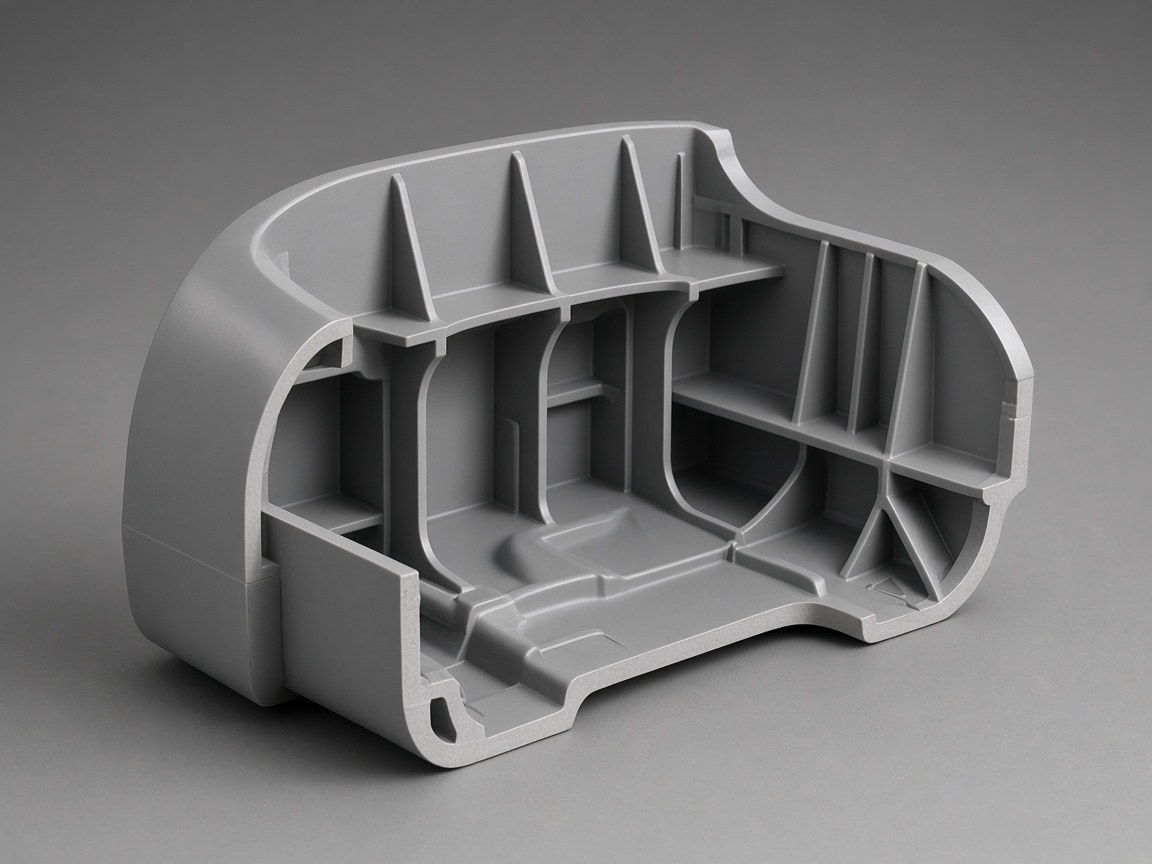
The solid is the first place to take the heat out. A core-out, a ribbed shell, or a boss that no longer sits on a solid pad changes the load before anyone lays out a cooling circuit. DFM flags those regions. It does not invent a circuit size for the print.
Even walls matter more than a race to the thinnest skin. A thin patch next to a heavy rib still cools as two different parts. Read the thin-wall guide for flow and pack, then come back here for the clock. Gas assist is the next question only when leftover thick mass cannot be cored in the pull. It is a packing path, not a substitute for section discipline.
Resin still moves the clock. A filled grade, a high-temperature polymer, or a soft skin over a rigid substrate will not cool like a commodity housing resin. Name the family and the thermal job on the RFQ. Leave the hold profile with the molder. If the grade is still open, say what the part must survive so DFM can flag when the open choice fights the cycle.
CAD Changes That Usually Matter First
Start with the solid, not the process sheet. The CAD changes that usually move cycle time are core-outs, even wall section, cooling access to hot spots, and eject faces that can accept a witness. None of those notes should include a circuit size or a wall figure copied from another program.
Work the edits in this order:
- Core out unused mass. If a region is solid only because it was easy to extrude in CAD, it is a cooling tax. Core it toward the pull so the remaining shell can freeze with the rest of the part. Keep stiffness with ribs or a change in outer shape, not with a hidden lump. DFM typically flags unused interiors on handles, feet, and housing walls modeled as solids. If a show face sits over the core-out, mark sink as a risk and say whether texture or a witness can hide it.
- Keep wall section even. Even section cools as one part. Local lumps cool as a second part stuck to the first. Blend bosses into the wall with a pad that is not a solid brick. Where a rib meets a skin, avoid a junction that recreates the mass you just cored out. Thin wall design covers fill and pack when the skin is already aggressive. This page only asks whether the section is even enough that cooling can finish together. If one corner is a heat reservoir, the cycle waits on that corner. Do not write a wall figure as a specification. State the job (cover, clip, structural rib) and let DFM flag where the section fights the clock.
- Give cooling a path to hot spots. Hot spots are bosses, hubs, logo blocks, and any region that stays thick after the first core-out. You do not size the cooling circuit. You leave steel and access so a circuit can approach that region from the mold side that owns it.
On the CAD, mark the hot spots and the faces you can open for core or cavity inserts. Avoid a forest of deep, closed pockets that trap heat with no path for a circuit. If a logo or a grip texture sits on the only face that could accept cooling, say which job wins. Gas assist is a special case of leftover thick mass. When a handle or a frame cannot be fully cored in the pull, gas assist injection molding is a packing path that hollows the remaining section. It is not a cheat code that lets a solid brick run like a thin cover. Specify it only when the leftover mass is real and the RFQ says why.
- Mark faces that can accept a witness. Ejector pins, sleeves, and valves leave marks. If every face is cosmetic, the molder may have to push on a slow-cooling side or add motion you did not budget. Mark the hidden faces that can take a witness. If a faster eject face exists on the core, say so. A witness note is not a process recipe. It is permission. DFM can then flag whether pin placement and cooling access can share the same side.
That sequence is the CAD side of injection molding cycle time reduction. Core-out first, even the remaining wall, open a path to whatever mass is left, then say where pins may land. If you skip to a process request, you are asking the press to hide a heat reservoir the steel still has to wait on.
Avoidable wait often comes from solid extrudes that were never shelled, bosses on a full-thickness pad, ribs that meet and rebuild a brick, or closed interiors that leave no steel for a circuit. Each of those is visible in the solid and easier to edit than a later steel change. When the industrial design cannot lose a thick look, keep the outer surface and core behind it. When a logo must stay proud, treat it as a named hot spot. Those questions belong on the RFQ in your own words.
What Stays With the Molder
Fill, pack, and cool settings stay with the molder. So do robot or operator handling, mold-open timing, and any secondary trim that happens at the press. These are process choices after DFM, not drawing notes.
A copied fill speed from a prior tool does not travel. Resin, gate, and steel layout change the shot. Writing a hold profile on the print usually gets ignored or, worse, treated as a contractual target the first samples cannot hit. Put the job on the RFQ (cosmetic face, sink limit in your own words, eject-mark zone) and leave the profile in the process book.
Handling is the same split. A robot, a picker, or an operator can add motion after the part is already cool enough to leave. You can ask whether the program needs in-press automation. If the part must leave gates attached or must stack in a tray, write that handling job. The molder sizes the motion.
Cooling circuits, manifold layout, and how fluid actually moves in the steel are also molder and mold-design work. Your job is access and section. Their job is the circuit once the layout exists. Do not put a channel size on the drawing. Do not paste a cycle-time target next to the title block and call it DFM.
If a first tool already runs and the clock feels long, bring the current solid, the resin grade, and a note about where the part is still hot or still sinking. That is evidence. It is not a request to publish the old recipe as a specification.
Do not send a copied fill, pack, or cool profile from another tool, a demand to freeze the part sooner than the thickest region can give up its heat, or a handling sequence that assumes the part is rigid while the CAD still holds unused mass. Send the job, the faces that matter, and the lumps that are intentional. Then DFM can flag whether the geometry is ready for a process book.
RFQ Checklist
Use this list when you upload CAD. Each step is a note DFM can flag. None of them is a press recipe.
- Mark locally thick regions on the CAD. Call bosses, hubs, solid handles, and logo blocks by name so the review does not have to guess which lumps are intentional.
- State the cosmetic faces that cannot show sink from a faster cool. If a face can accept texture or a witness, say that too.
- Name the resin family or the thermal job if the grade is still open. Impact, heat, and a soft skin over a rigid substrate all change cool time.
- Ask DFM whether a core-out or gate move beats a process chase. A flag here is a design question, not a promise that the tool will keep every feature as drawn.
- Upload CAD through the instant quote platform.
A short RFQ note that follows those five steps is enough. You do not need a cycle-time cell on the form. If you already ran an interim tool elsewhere, you may say what felt slow, as comparison context for the steel tool you are quoting now.
Keep the file set simple: the production solid, colored faces for cosmetics, and the resin note. If gas assist is in play, say which section cannot be cored in the pull. If eject marks are allowed only in a pocket, shade that pocket.
Example language: locally thick handle interior and screw bosses; A-side show face cannot show sink; hidden core face may take ejector witness; resin family PC-ABS for an impact and heat job; please flag whether a core-out or gate move beats a process chase. That note names the job without a clock, a wall figure, or a circuit size.